Finally We Can Properly Handle SharePoint Embedded During Offboarding
Tony had the news a couple of weeks ago, but since I wasn’t seeing evidence of it myself, I hesitated to share this link:
Handling User-Owned Loop Workspaces for ex-Employees
The creation of the Redirect URL changes the game when it comes to changing ownership of a Loop Workspace.
Prior to this, if content in a workspace needed to be kept, you could do so, but you couldn’t give anyone a link to access it directly. Either they had it in their recent Loop workspaces, or they didn’t.
In my sample below, you’ll see the URL, which we already know isn’t one you can navigate to.
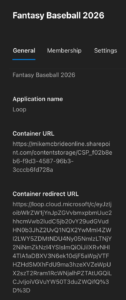
Copying the Redirect URL, though, and pasting it into my browser, took me straight to that workspace:
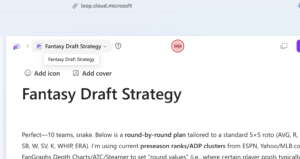
As I mentioned, this is a huge win for offboarding and information governance. It might not seem like much, but embedded containers are a bit of a compliance nightmare: while you can collect them with tenant-wide searches, you cannot navigate to them to view the content. You’re often flying blind when someone leaves the organization and leaves Loop Workspaces behind, because I can take ownership, but I couldn’t review the content. Now, I can review the content and share it with a new owner as necessary.
This should help many of us govern Loop Workspaces much, much more effectively.
 Share this post on social media.